Turn on suggestions
Auto-suggest helps you quickly narrow down your search results by suggesting possible matches as you type.
Showing results for
- Authorize.net Developer Community
- Authorize.net Community Discussions
- Integration
- Re: AcceptJs Hosted Live Processes Successful I_WC...
Options
- Subscribe to RSS Feed
- Mark Topic as New
- Mark Topic as Read
- Float this Topic for Current User
- Bookmark
- Subscribe
- Mute
- Printer Friendly Page
Options
- Mark as New
- Bookmark
- Subscribe
- Mute
- Subscribe to RSS Feed
- Permalink
- Report Inappropriate Content
AcceptJs Hosted Live Processes Successful I_WC_01But No Transactions Appear
Hello,
We have been testing AcceptJs for months now using the Sandbox account. Today we felt confident enough to switch over to Live.
We changed over to use the Live version of:
https://js.authorize.net/v3/AcceptUI.js
apiLoginID
clientKey
The transaction processed succefully getting this response
code:"I_WC_01"
text:"Successful."
But transactions are not showing up on in the reports.
I called support and they say they are not seeing any attempts to process a transaction. This is very odd to me since I am using the Live URL (https://js.authorize.net/v3/AcceptUI.js),shouldn't it be attempting to process live transactions? My live ApiLoginID and clientKey work give I'm getting a success response.
Support confirmed that my account is not in Test mode. The person I was speaking with was not familar with AcceptJs.
During one of my tests on the LIVE setup I used a bad credit card, and I still got back a success response. I'm hitting some kind of test area. But it's not my sandbox account or my live account in test mode.
Has anyone seen this before?

08-09-2018 08:49 PM
4 REPLIES 4
Options
- Mark as New
- Bookmark
- Subscribe
- Mute
- Subscribe to RSS Feed
- Permalink
- Report Inappropriate Content
Hello @appclan
It appears you're getting a payment nonce back from the server, like the one below.
{
  "opaqueData": {
    "dataDescriptor": "COMMON.ACCEPT.INAPP.PAYMENT",
    "dataValue": "eyJjb2RlIjoiNTBfMl8wNjAwMDUzNUE1OTkzREQ1NEM1NzY0OTgwNTZDQzY5MEVBRjY5MTU3RjBEQThEMjU2N0EyQkUwMUNBNzQ5QkY0ODRDMTgyMjRGN0IzMEE4REI2MUJDQUI1NDMxMTZCNzkwOUM3OUMwIiwidG9rZW4iOiI5NTA3OTE3MzE1NTg5OTYzOTA0NjA0IiwidiI6IjEuMSJ9"
  },
  "messages": {
    "resultCode": "Ok",
    "message": [{
      "code": "I_WC_01",
      "text": "Successful."
    }]
  },
  "encryptedCardData": {
    "cardNumber": "XXXXXXXXXXXX1111",
    "expDate": "12/22",
    "bin": "411111"
  },
  "customerInformation": {
    "Ellen": "",
    "Johnson": ""
  }
}
What was the response after Using the Payment Nonce in an API Request From Your Server?
Richard


08-09-2018 09:30 PM
Options
- Mark as New
- Bookmark
- Subscribe
- Mute
- Subscribe to RSS Feed
- Permalink
- Report Inappropriate Content
Not sure if this is what your referring to but it similiar
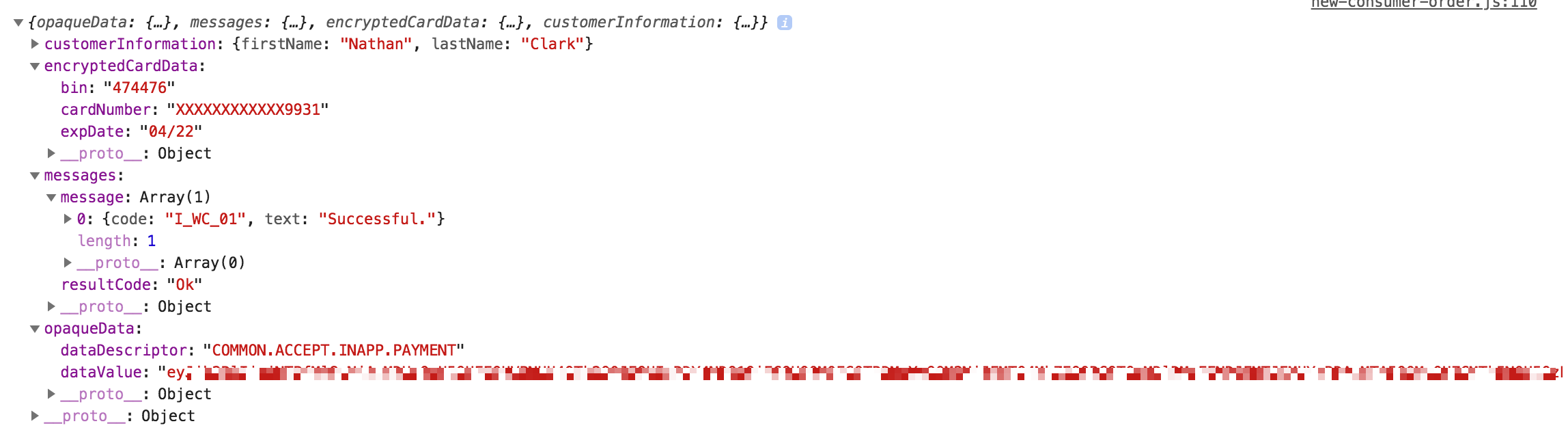
The host form AcceptUI responds with the above. When testing with the sandbox, I would have had an unsettled transaction in my account after receiving this.
Similar to what is being done in the "Example of the Complete HTML Page"
of https://developer.authorize.net/api/reference/features/acceptjs.html
08-09-2018 10:06 PM
Options
- Mark as New
- Bookmark
- Subscribe
- Mute
- Subscribe to RSS Feed
- Permalink
- Report Inappropriate Content
Hi @appclan
Need to understand more on your flow . Are you calling our createTransaction API after getting the Accept Token as explained here
Thanks


08-09-2018 10:56 PM
Options
- Mark as New
- Bookmark
- Subscribe
- Mute
- Subscribe to RSS Feed
- Permalink
- Report Inappropriate Content
https://js.authorize.net/v3/AcceptUI.js
BUTTON
<button type="button"
    class="AcceptUI btn btn-primary payButton"
    data-billingAddressOptions='{"show":true, "required":false}'
    data-apiLoginID="MYCODE"
    data-clientKey="MYCODE"
    data-acceptUIFormBtnTxt="Submit"
    data-acceptUIFormHeaderTxt="Card Information"
    data-responseHandler="responseHandler" >Pay With Credit Card
</button>
Handler
responseHandler = function (response) {
    if (response.messages.resultCode === "Error") {
        var i = 0;
        while (i < response.messages.message.length) {
            console.log(
                response.messages.message[i].code + ": " +
                response.messages.message[i].text
            );
            i = i + 1;
        }
    } else {
        console.log("it works!",response.opaqueData);
        document.getElementById("dataDescriptor").value = response.opaqueData.dataDescriptor;
        document.getElementById("dataValue").value = response.opaqueData.dataValue;
        if(response.opaqueData.dataDescriptor === 'COMMON.ACCEPT.INAPP.PAYMENT'){
            server.call('orders.newOrder', {
                cart: Session.get('currentCart'),
                consumerDetails: orderArray,
                campaignId: campaignId
            }, (err, res) => {
                if (err) {
                    success(err);
                } else {
                    router.go(`/thanks`);
                }
            });
        }
    }
}
That's it. I was not doing anything server side. If I was suppose to, why does the sandbox show transactions?
08-10-2018 06:53 AM

Related Topics
- SIM Relay Response – Blocked Script Execution Error After Payment in Integration and Testing
- Transaction succeeds but webhook not received consistently in Integration and Testing
- Silent Post URL not receiving transaction response after successful payment – how to debug? in Integration and Testing
- "The transaction was unsuccessful." in Integration and Testing
- Has anyone been able to successfully integrate Apple Pay with ARB or any sort of recurring payments? in Integration and Testing
